There’s so much content out there right now, and people are spending more time online. In fact, people spent almost 3 hours daily on social media in 2025. And if you want them to see your brand, you need high-quality digital assets for online engagement.
More so, with the right assets, you can shape how people see your brand. Plus, it can help you build trust with your potential customers.
So, in this guide, we’ll break down the different assets you can use and how to create them. You’ll also see how you can use these assets to drive engagement online.
Let’s get started.
Types of Digital Assets for Online Engagement
Your digital assets for online engagement work best when they match how your users consume content on different channels. That’s because you need the right type to get the interaction you want. So, let’s look at the different digital assets you can use.
Visual Assets
You can use visual assets like banners, branded graphics, and short animations to communicate a message in seconds. But, for this to work, they should have:
- Clear focal points and minimal text
- Consistent branding across different formats
- Strong contrast, especially for mobile devices
Take this banner, for example:

The good thing is: You can get a jump start using a banner design from an online tool. And it’s not just banners. These tools also have other visual asset templates you can use instead of starting from scratch.
You can then use these digital assets for online engagement on:
- Your website hero sections and landing pages
- Social media feeds and paid ads
- Your email headers and promotional blocks
One important thing: design your visual assets for the platform they would appear on. So, if a banner works on your website, adjust it before reusing it on your social media.
| Your visual assets work best when they are intentionally designed for the preferred channel. |
Interactive Assets
With these assets, you ask your users to do something instead of just viewing a graphic. You can use calculators, quizzes, polls, and even product demos. This way, you’re rewarding them for participating. Take HubSpot’s website grader, for example:
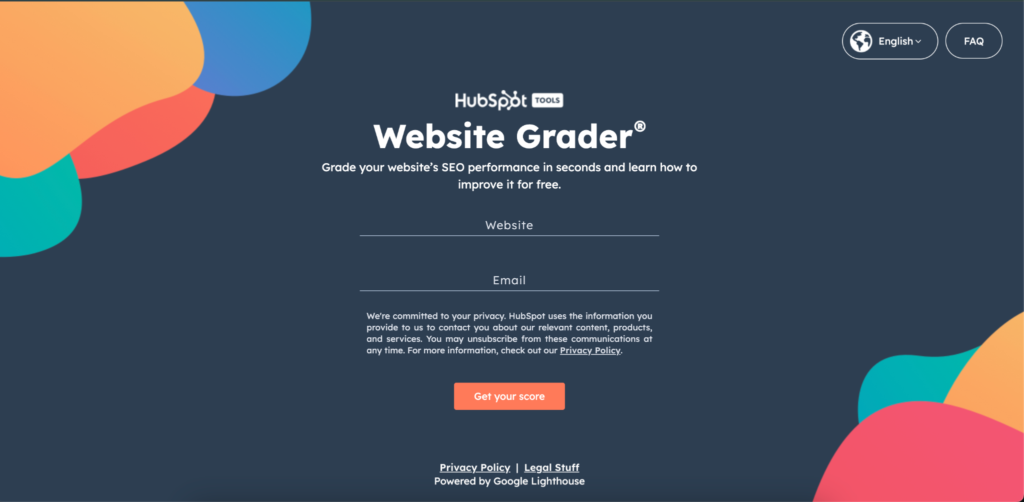
These can work as digital assets for online engagement by:
- Increasing time on page
- Encouraging users to come back
- Creating personalized experiences
Even more, you can use them for lead qualification and educating users on your product. Plus, they can help guide users to other related content on your website.
Assets for Building Trust
These don’t just work as digital assets for online engagement. You can use them in your customer journey to help users make a decision or take action. So you can use social proof, public roadmaps, testimonials, and FAQs to:
- Answer objections before they arise
- Demonstrate transparency and credibility
- Reinforce your brand’s value
The best places you can use these kinds of assets include:
- Near your calls to action
- On your pricing or comparison pages
- Within your onboarding or evaluation flows
One thing, though: You should make these assets feel authentic and specific. So, don’t use vague testimonials or generic claims.
| You can use your digital assets to build trust, reduce hesitation, and keep users engaged longer. |
How to Create Digital Assets for Online Engagement
You want a repeatable process when creating digital assets for online engagement. It’s not a one-off, and this way, you can create other assets faster. So, let’s see how to create your assets.
Step 1: Align Your Assets With a Marketing Goal
Your digital assets should support a specific marketing goal. And you need to define that early, whether it’s for:
- Awareness, where you need to increase visibility and first-touch interaction.
- Conversion, when you need more sign-ups, demos, or buys.
- Retention, where you want to push for repeat purchase.
Once your goal is clear, match the asset type to the user intent. For instance, you can use short visuals for awareness and interactive assets if your goal is conversion.
| Your engagement can improve when digital assets serve a specific goal. |
Step 2: Use a Clear Design
Your users need to understand the message on your digital assets within seconds. So, use clear visual hierarchy, short, scannable text, and visible calls to action, just like in this design:

Additionally, avoid overdesign and excessive animation. Plus, don’t use dense layouts or unclear messaging.
| Prioritize clarity when designing digital assets for online engagement for better effectiveness. |
Step 3: Recreate the Process Without Losing Quality
You’ll need more digital assets for online engagement as your campaigns grow. So, to scale the process, create reusable templates and shared brand guidelines.
Plus, you can hire a personal assistant to help create multiple assets if you’re out of time. But, ensure your process is clearly defined.
| You can scale how you design digital assets for online engagement to keep interaction consistent across your channels. |
Best Ways to Optimize Your Digital Assets for Distribution
Once you’re done creating your digital assets for online engagement, you need to distribute them intentionally. Plus, you should optimize them for how your audience discovers and consumes content.
So, depending on your preferred channel:
- Prioritize load speed, clarity, and placement if it’s for your website.
- Use lightweight visuals and clear above-the-fold CTAs for emails.
- Design for silent viewing and quick understanding if it’s for social media.
- Focus on one message per asset to avoid distraction if you’re using paid media.
| Your digital assets for online engagement work best when you tailor them to the specific channel. |
How to Measure Engagement to Modify Your Assets
You need to measure the right metrics to see how your digital assets for online engagement perform. So, check for click-through rate (CTR), time on page, and scroll depth or interaction rate.
Once you have these, use them to identify any friction points in your customer journey. For instance, if users don’t engage with your assets, you can figure out if it doesn’t align with intent or if it’s the messaging.
| Continuously optimize your digital assets for online engagement to turn good ones to high-performers. |
FAQ
- What digital assets perform best for online engagement?
The best digital assets depend on your audience’s intent and the channel you’re using. You can use visual assets for awareness, interactive tools for better engagement, and trust-building assets for near conversion points.
| How your digital assets perform depends on audience intent and channel fit, so don’t rely on just one format. |
- How often should digital assets be refreshed?
You can review your digital assets at least quarterly, and when you notice engagement metrics decline. But, you can update your high-traffic assets more frequently, especially on social and paid channels.
| You should update your assets regularly to keep them relevant and engaging. |
- Can small teams create effective digital assets?
Yes. If you have a small team, they can use templates, clear workflows, and online tools to create effective digital assets for online engagement.
Conclusion
Your digital assets for online engagement affect how audiences interact with your brand across every channel. So, design them with clear goals, optimize for distribution, and measure performance consistently.
So, review your existing assets. Check if they support a marketing goal, then create a repeatable process for creating these assets.
| Your digital assets for online engagement will work best when there’s a clear goal, and they’re well-designed and optimized. |